Top Small Business Ideas in Pakistan | Bhatti Marketing
Facebook Retargeting Strategies That Boost Sales
Digital advertising has become more competitive than ever, and businesses need accurate data to understand what customers do after clicking an advertisement. A proper Meta Pixel Setup Guide helps marketers connect their websites with Meta platforms, collect valuable visitor information, and improve their advertising decisions.
Many businesses spend money on Facebook and Instagram ads but struggle to understand which campaigns actually bring customers. Without proper tracking, it becomes difficult to measure results, optimize ads, or reach the right audience.
Meta Pixel provides a solution by allowing businesses to track actions that happen on their websites. From page visits to purchases, it gives marketers useful insights that help improve campaigns and increase return on investment.
This beginner-friendly guide explains everything you need to know about setting up Meta Pixel, installing it correctly, tracking events, and using collected data to build stronger advertising strategies.
What Is Meta Pixel and How Does It Work?
Meta Pixel is a small piece of tracking code that businesses add to their websites. It connects a website with Meta platforms, including Facebook and Instagram, allowing advertisers to understand visitor behavior.
When someone visits a website, Meta Pixel collects information about specific actions they take. These actions may include viewing a page, clicking a button, adding a product to a cart, filling out a form, or completing a purchase.
The collected data helps advertisers understand customer journeys. Instead of showing ads randomly, businesses can use this information to reach people who are more likely to become customers.
For example, if a person visits an online store but leaves without purchasing, Meta Pixel can help the business show that visitor a reminder advertisement later. This process is known as retargeting.
Meta Pixel works through events. Events are specific actions that happen on a website. Businesses can track different events depending on their goals, such as sales, leads, registrations, or engagement.
Why Meta Pixel Is Important for Businesses
Modern marketing depends on data. Businesses cannot rely only on assumptions when investing in advertising. Tracking customer actions allows companies to make smarter decisions.
A properly installed tracking system helps businesses identify which advertisements generate valuable results. Instead of focusing only on clicks, marketers can analyze meaningful actions like purchases and sign-ups.
Meta Pixel also improves audience targeting. When enough visitor data is collected, businesses can create audiences based on user behavior. This makes advertisements more relevant and increases the chances of conversions.
Another major advantage is campaign optimization. Meta’s advertising system uses collected data to find people who are more likely to complete a desired action. This helps improve ad delivery over time.
Benefits of Setting Up Meta Pixel
A website connected with Meta Pixel gives businesses several advantages. It provides deeper insights into customer behavior and helps create more effective advertising campaigns.
One of the biggest benefits is conversion tracking. Businesses can see whether their advertisements lead to actual results instead of only measuring impressions or clicks.
It also helps with audience creation. Marketers can create custom audiences from website visitors and target people who have already shown interest in their products or services.
Lookalike audiences are another powerful feature. Businesses can find new potential customers who have similar characteristics to their existing customers.
With accurate tracking, advertising budgets can be managed more effectively. Companies can reduce wasted spending and focus on campaigns that produce better outcomes.
Requirements Before Meta Pixel Setup
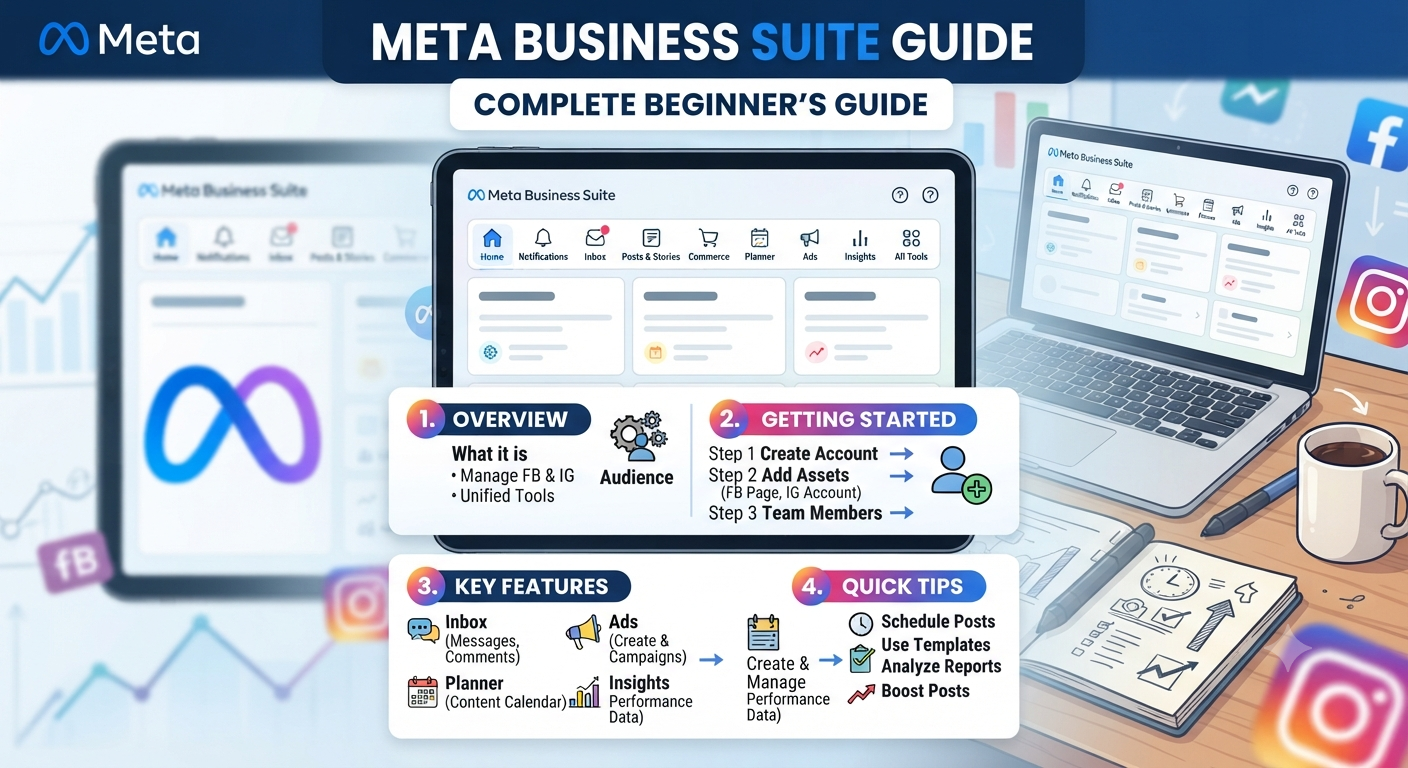
Before installing Meta Pixel, businesses should prepare a few important things. The first requirement is a Meta Business account because Pixel management happens through Meta Business tools.
A website is also required because the tracking code needs to be placed on website pages. Businesses should have access to their website backend or work with a developer who can add the code.
An active advertising account is useful because Pixel data is mainly used for improving paid campaigns. However, the tracking setup can be completed before launching advertisements.
It is also important to decide what actions need to be tracked. Different businesses have different goals. An online store may focus on purchases, while a service company may focus on leads and contact forms.
Step-by-Step Meta Pixel Setup Guide
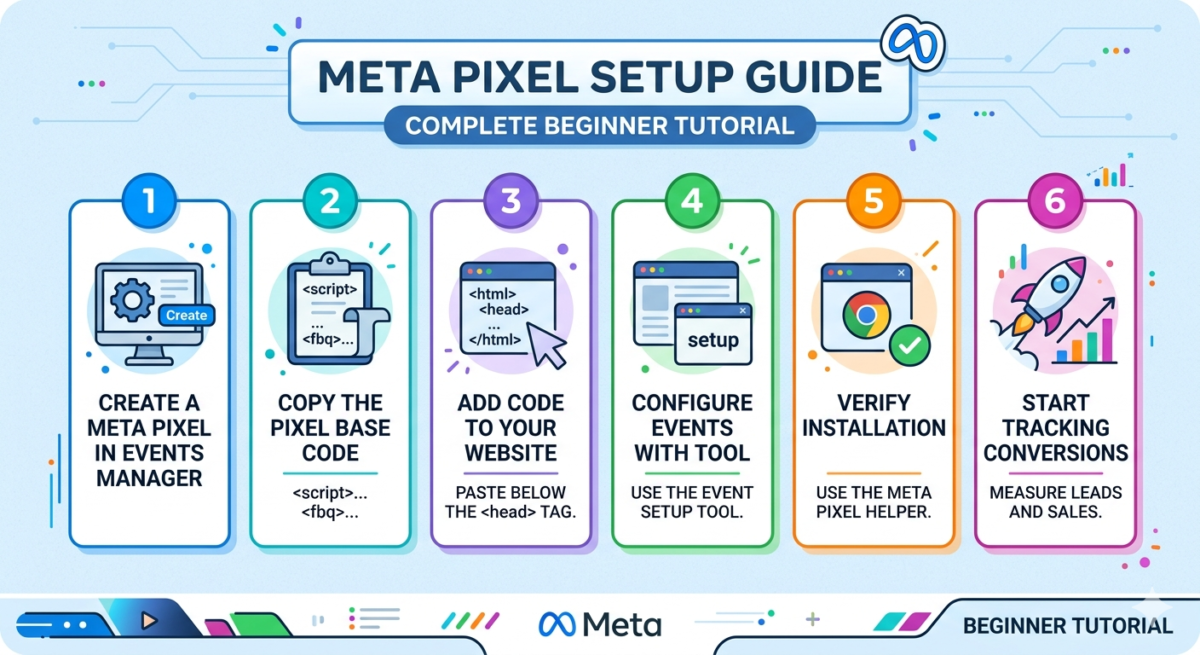
Setting up Meta Pixel involves creating a Pixel, adding it to a website, and testing whether it collects data correctly.
The first step is opening Meta Events Manager. This is the area where businesses manage their data sources and tracking tools.
After entering Events Manager, businesses can create a new data source. The system will ask for basic details and generate a unique Pixel ID.
This Pixel ID connects the website with the business advertising account. Each website normally has its own tracking setup to keep data organized.
Once the Pixel is created, the next step is installation. Businesses can install it manually by adding the tracking code to their website header section.
For websites built with platforms like WordPress, installation can often be completed using trusted plugins that connect the website with Meta tools.
After installation, testing is important. Many tracking problems happen because the code is added incorrectly or events are not configured properly.
Adding Meta Pixel to Your Website
The installation method depends on how the website was created.
For custom websites, developers usually add the Pixel code directly into the website’s header section. This allows the tracking script to load on every page.
For content management systems, businesses can use integrations that simplify the process. These tools help connect the website without manually editing code.
After adding the tracking code, businesses should verify whether Meta receives website activity. Testing prevents future reporting problems and ensures accurate campaign measurement.
Understanding Meta Pixel Events
Events are the foundation of website tracking. They tell Meta what visitors do after arriving on a website.
The PageView event tracks when someone opens a website page. It is usually automatically collected after Pixel installation.
The ViewContent event tracks when visitors view important content, such as product pages or service pages.
The AddToCart event is commonly used by online stores. It identifies visitors who add products but may not complete their purchase.
The Purchase event tracks completed transactions and helps businesses understand which advertisements generate sales.
Lead events are useful for service-based businesses. They track actions such as form submissions, registrations, and inquiries.
Using Meta Pixel for Better Ads
Once the tracking system is properly connected, businesses can use collected data to improve their advertising strategy. The real value comes from turning visitor information into smarter marketing decisions.
One of the most useful features is audience building. Businesses can create groups of people based on their website activity. For example, a company can target users who visited a service page but did not contact them.
This approach is more effective than showing the same advertisement to everyone because it focuses on people who have already shown interest.
Retargeting campaigns are another important use case. Many customers do not make a purchase or submit an inquiry during their first visit. Retargeting allows businesses to reconnect with these visitors and encourage them to complete their journey.
Meta Pixel also helps advertisers improve campaign performance by providing conversion signals. When Meta understands which users complete specific actions, its system can optimize ad delivery toward similar people.
Common Meta Pixel Setup Mistakes
Many businesses install tracking tools but fail to use them correctly. Small mistakes can create inaccurate data and affect advertising decisions.
One common issue is incorrect installation. If the code is placed incorrectly, website activity may not be recorded properly.
Another mistake is tracking only basic page views while ignoring important actions. Businesses should configure events based on their actual goals.
Duplicate tracking is also a frequent problem. When the same event fires multiple times, reports may show incorrect numbers and create confusion.
Some businesses forget to test their setup after installation. Testing helps identify problems early and ensures that collected information is reliable.
Meta Pixel vs Conversions API
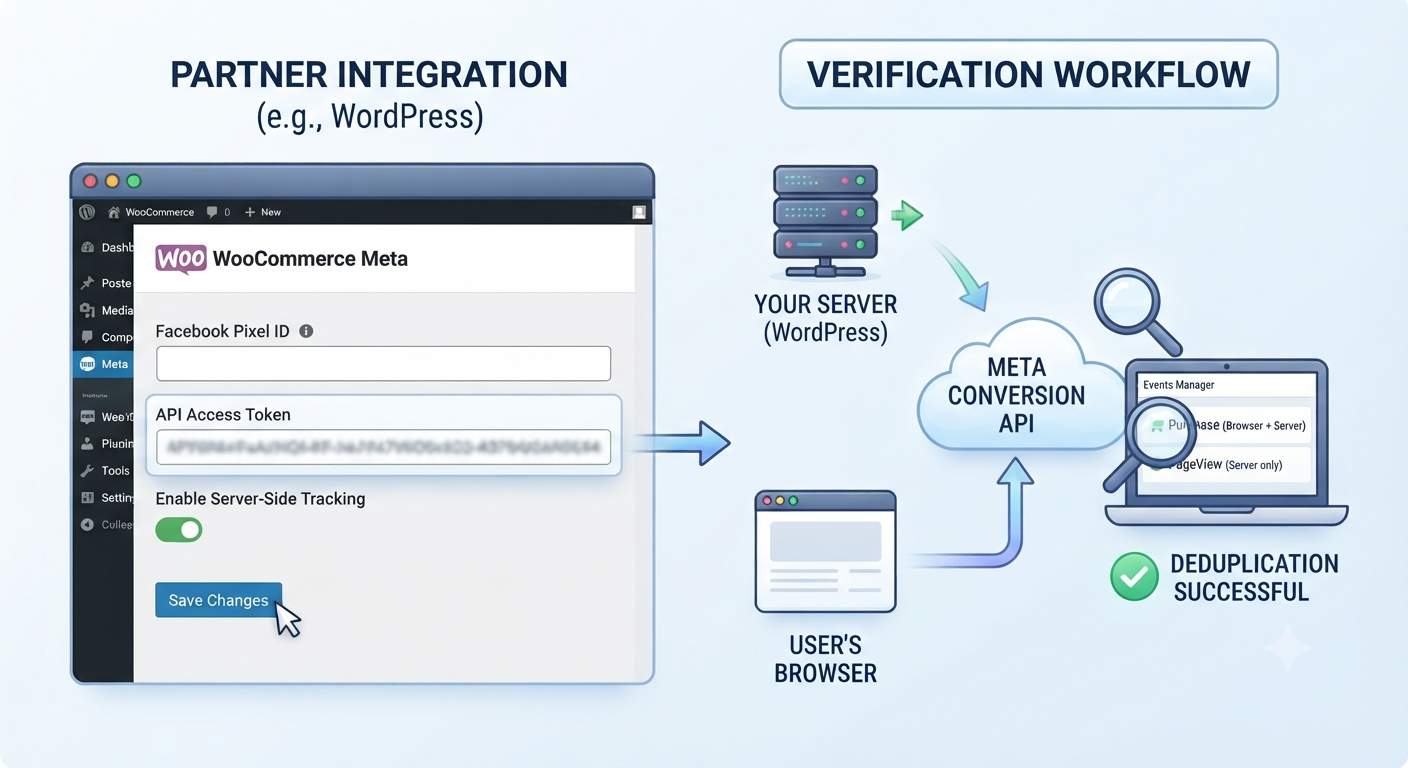
Meta Pixel works through browser-based tracking. It collects information when visitors interact with a website using their browser.
However, privacy changes and browser restrictions have affected traditional tracking methods. This is where Conversions API becomes useful.
Conversions API sends data directly from a business server to Meta. It provides another way to share conversion information and can improve tracking accuracy.
Many businesses now use both solutions together. Combining browser tracking and server-side tracking creates a stronger measurement system.
How to Improve Your Tracking Strategy
A successful tracking setup requires regular monitoring. Businesses should review their events, analyze customer behavior, and update their advertising strategy based on performance.
Tracking should match business objectives. An ecommerce brand may focus on purchases, while a security company may focus on consultation requests or service inquiries.
The goal is not just collecting data but understanding how that data supports growth.
Marketers should also create clear conversion paths. A visitor should move naturally from discovering a service to taking action.
The Role of Data in Modern Digital Marketing
Digital marketing is no longer based only on creativity. Successful campaigns combine creative messaging with accurate customer insights.
Tracking tools help businesses understand what works and what needs improvement. They remove uncertainty from advertising decisions.
With proper analytics, businesses can identify their strongest audiences, improve customer experiences, and build campaigns that deliver measurable results.
Conclusion
A strong tracking foundation is essential for businesses that want better results from online advertising. A properly implemented Meta Pixel helps companies understand visitors, measure important actions, and improve marketing performance.
Learning the setup process allows businesses to make informed decisions instead of depending on guesswork. From creating audiences to improving ad campaigns, accurate tracking creates opportunities for long-term growth.
Businesses that use data effectively can reach the right customers, improve their advertising efficiency, and build stronger relationships with their audience.
Frequently Asked Questions
What is Meta Pixel used for?
Meta Pixel helps businesses track website visitors and understand actions taken after users interact with advertisements. It supports conversion tracking, audience creation, and campaign optimization.
Is Meta Pixel free to use?
Yes, Meta Pixel is available free of charge. Businesses can create and use it through Meta Business tools without paying an additional fee.
How long does Meta Pixel take to set up?
The setup time depends on the website platform. A simple website may take a few minutes, while custom websites may require developer support.
Can Meta Pixel track purchases?
Yes, businesses can configure purchase tracking to measure completed transactions and understand which campaigns generate sales.
Do businesses need technical knowledge to install Meta Pixel?
Basic installations can be completed with website tools and plugins. More advanced setups may require technical assistance.
What is the difference between Meta Pixel and Conversions API?
Meta Pixel collects data through the browser, while Conversions API sends information directly from the server. Many businesses use both together for improved tracking.
Grow Your Digital Results With Expert Marketing Support
Setting up tracking correctly is only the first step. The real growth comes from using accurate data to create better campaigns, improve customer journeys, and increase conversions.
At Bhatti Marketing, we help businesses build result-focused digital strategies using SEO, paid advertising, analytics, and conversion optimization techniques. Our team focuses on creating marketing solutions that connect businesses with the right audience.
Explore our proven strategies and real-world results through our case studies from Bhatti Marketing. See how data-driven marketing helps businesses improve visibility, generate leads, and achieve sustainable growth.
Contact Bhatti Marketing today and take the next step toward building a stronger online presence.