Meta Business Suite Guide: Complete Beginner’s Guide
Modern digital marketing depends on accurate data. Conversion API Setup has become one of the most effective ways to improve tracking accuracy, reduce data loss, and make better advertising decisions. As browsers continue limiting third-party cookies and more users adopt ad blockers, relying only on browser-based tracking is no longer enough.
Whether you manage an eCommerce store, generate business leads, or run paid advertising campaigns, server-side tracking helps capture valuable conversion data that traditional pixels often miss. This guide explains everything beginners need to know, from understanding how Conversion API works to preparing your website for a successful implementation.
Instead of focusing on technical jargon, we’ll walk through practical concepts and best practices that businesses can use to improve reporting, optimize campaigns, and increase return on advertising spend.
What Is Conversion API (CAPI)?
Conversion API, commonly known as CAPI, is a server-side tracking solution developed by Meta. Instead of sending customer events directly from a visitor’s browser, the information is securely transmitted from your web server to Meta’s servers.
This approach creates a more reliable connection because browser restrictions, cookie limitations, and ad blockers have less impact on server-side data collection.
Traditional Meta Pixel tracking depends entirely on browser activity. If a browser blocks scripts or a user disables cookies, important conversion events may never reach Meta Ads Manager. Server-side tracking solves this problem by sending data directly from the server, helping advertisers receive more complete reporting.
Today, many businesses combine Meta Pixel with Conversion API to maximize event accuracy while maintaining a privacy-conscious approach.
Browser Tracking vs Server-Side Tracking
Understanding the difference between these tracking methods helps explain why Conversion API has become an industry standard.
| Feature | Browser Tracking (Meta Pixel) | Server-Side Tracking (Conversion API) |
|---|---|---|
| Data Source | User’s browser | Website server |
| Cookie Dependency | High | Low |
| Ad Blocker Impact | High | Minimal |
| Tracking Accuracy | Moderate | High |
| Data Reliability | Can be interrupted | More consistent |
| Privacy Control | Limited | Better control |
| Recommended Today | Yes (with limitations) | Yes, alongside Pixel |
Using both tracking methods together gives advertisers the most complete picture of customer activity while reducing data loss.
Why Businesses Use Conversion API Setup
Digital advertising platforms rely on accurate conversion data to optimize campaigns. When conversions are missed, advertising algorithms receive incomplete information, making it harder to find high-quality customers.
Businesses implement server-side tracking because it helps improve attribution, increases reporting accuracy, and supports machine learning models that optimize advertising performance.
Organizations running Meta Ads often notice stronger event quality after implementing Conversion API correctly, especially when tracking purchases, lead forms, appointments, registrations, and newsletter sign-ups.
For businesses spending significant budgets on Facebook and Instagram advertising, even small improvements in data accuracy can lead to better campaign optimization over time.
Benefits of Conversion API Setup
Server-side tracking offers more than improved reporting. It creates a stronger foundation for long-term digital marketing performance, especially as privacy regulations continue evolving.
Improved Tracking Accuracy
Modern browsers regularly block tracking scripts, which can prevent important events from being recorded. Server-side communication significantly reduces this issue by sending events directly from your server.
As a result, advertisers receive more complete conversion data, allowing campaign optimization algorithms to work with higher-quality information.
Better Attribution
Marketing decisions depend on understanding which campaigns generate actual business results.
When browser tracking misses events, attribution reports become less reliable. Server-side tracking helps recover missing conversions, making it easier to evaluate campaign performance across different audiences and advertising objectives.
Better attribution also improves budget allocation because marketers can confidently invest in campaigns that deliver measurable outcomes.
Stronger Privacy Compliance
Privacy regulations continue changing across the world. Businesses are expected to handle customer information responsibly while remaining transparent about data collection.
Conversion API supports privacy-focused marketing because businesses maintain greater control over the information they share with advertising platforms.
When implemented correctly, organizations can send only the data necessary for campaign measurement while following applicable privacy policies and user consent requirements.
Reduced Impact of Browser Restrictions
Browsers such as Safari and Firefox have introduced tracking prevention technologies that limit browser-based analytics.
Many users also install ad blockers that stop marketing scripts before they execute.
Since Conversion API communicates directly from the server, these browser limitations have less impact on conversion measurement.
This results in more stable reporting over time.
Higher Event Match Quality
Meta attempts to match conversion events with user accounts to improve campaign optimization.
Server-side implementations often include securely hashed customer information such as email addresses or phone numbers, improving Event Match Quality without exposing sensitive personal data.
Higher match quality allows Meta’s advertising system to better understand customer journeys, which can improve audience targeting and campaign learning.
Improved Campaign Optimization
Advertising algorithms perform best when they receive consistent, high-quality conversion signals.
Missing purchase events or lead submissions make optimization more difficult.
A properly configured server-side implementation provides more reliable signals, helping campaigns optimize toward valuable business outcomes rather than incomplete datasets.
Over time, advertisers may experience more efficient spending and improved conversion performance.
Prerequisites Before Setup
Before implementing server-side tracking, it’s important to prepare your website and advertising accounts correctly. Proper preparation reduces implementation errors and simplifies testing.
Access to Meta Business Manager
You should have administrative access to your Meta Business Manager account.
This provides access to Events Manager, Pixel settings, datasets, access tokens, and Conversion API configuration tools.
Without administrative permissions, you may not be able to complete the setup process.
Meta Pixel Installed
Although Conversion API can technically operate independently, Meta recommends using both Pixel and server-side tracking together.
The Pixel continues collecting browser events, while the server captures additional events that browsers may miss.
Using both methods together creates a more complete tracking strategy.
Website or Server Access
You’ll need access to your website backend or hosting environment.
Depending on your implementation method, this may include:
- WordPress Administrator
- Shopify Admin
- WooCommerce Dashboard
- Google Tag Manager
- Server Hosting
- Cloud Platform
- Developer Access
The required level of access depends on whether you’re using a partner integration or a custom implementation.
Domain Verification
Meta recommends verifying your website domain inside Business Manager.
Verified domains improve security and allow you to configure Aggregated Event Measurement, which is important for advertising optimization following Apple’s privacy updates.
Event Planning
Before implementing tracking, identify the important customer actions you want to measure.
Common events include:
- Page View
- View Content
- Add to Cart
- Initiate Checkout
- Purchase
- Lead
- Contact Form Submission
- Complete Registration
- Schedule Appointment
Planning these events in advance makes implementation more organized and helps avoid unnecessary tracking later.
Prepare for Testing
Successful implementation doesn’t end after configuration.
Testing is essential to confirm that events are being received correctly, duplicates are avoided, and event quality remains high.
Meta provides built-in testing tools that help verify server events before they are used for campaign optimization.
Conversion API Setup Methods
There is no single implementation method that works for every business. The right approach depends on your website platform, technical expertise, available resources, and marketing goals. Some businesses can complete the setup in minutes using built-in integrations, while others may require a custom server-side implementation for greater flexibility.
Understanding each option helps you choose a solution that fits your current needs while leaving room for future growth.
Partner Integration
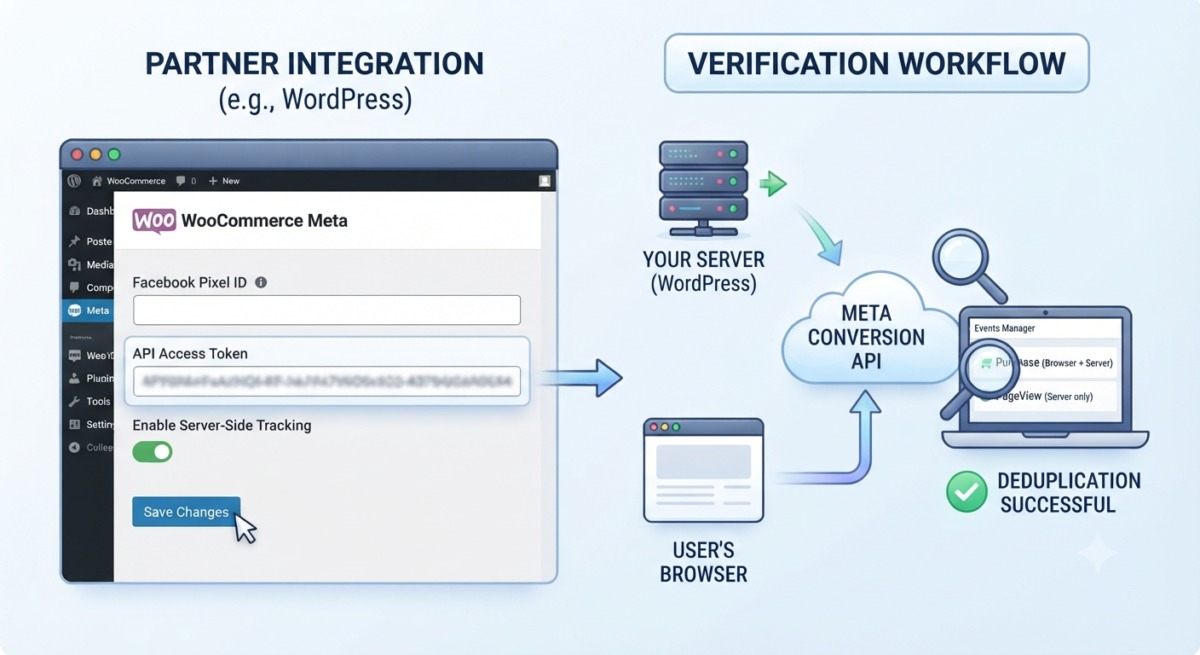
Partner integrations are the easiest way for beginners to implement server-side tracking. Meta works with several popular website platforms that automate much of the setup process without requiring advanced programming knowledge.
These integrations handle event transmission, authentication, and many technical configurations automatically.
If you operate a standard online store or service website, a partner integration is usually the fastest way to begin collecting server-side events.
Shopify
Shopify includes direct support for Meta’s marketing tools through the Facebook & Instagram sales channel.
After connecting your Meta Business account, Shopify can automatically send important customer events such as product views, add-to-cart actions, checkout events, and completed purchases.
This method reduces manual configuration while maintaining reliable event reporting.
WooCommerce
WooCommerce users can integrate Conversion API through official Meta plugins or trusted third-party extensions.
Once connected, customer activities can be transmitted from both the browser and the server, creating more complete reporting for advertising campaigns.
WooCommerce stores benefit from accurate purchase tracking, improved attribution, and stronger optimization signals.
WordPress
WordPress websites have several implementation options depending on business requirements.
Many website owners choose plugin-based integrations because they simplify setup while requiring minimal technical knowledge.
Businesses with advanced tracking requirements often combine WordPress with Google Tag Manager Server-Side for greater customization and control.
Other Supported Platforms
Several other platforms also support Conversion API integrations, including Magento, BigCommerce, OpenCart, and custom eCommerce solutions.
Businesses should review their platform’s available integrations before selecting a manual implementation.
Manual Server Setup
Some organizations require more flexibility than automated integrations provide.
Custom server-side implementations allow developers to control exactly which events are transmitted, what customer information is included, and how event processing works behind the scenes.
Although this method requires technical expertise, it offers maximum customization and scalability.
Using Google Tag Manager Server-Side
Google Tag Manager Server-Side has become one of the most popular methods for implementing Conversion API.
Instead of sending tracking requests directly from the user’s browser, GTM Server-Side routes events through a secure server container before forwarding them to Meta.
This architecture offers several advantages.
It improves data reliability, enhances privacy controls, reduces dependence on browser cookies, and provides better control over event processing.
Many growing businesses adopt this approach because it supports multiple marketing platforms from a single server environment.
Cloud Hosting
A server-side container requires hosting.
Many organizations deploy their GTM Server container on cloud platforms where resources automatically scale with website traffic.
Cloud hosting provides reliability, security, and consistent performance while minimizing downtime.
Choosing a stable hosting environment helps maintain uninterrupted event transmission during high-traffic periods.
Direct API Integration
Large organizations often integrate directly with Meta’s Conversion API using their own backend systems.
This approach gives developers complete control over event creation, parameter mapping, customer identifiers, and data processing.
Direct integration is particularly useful for businesses with custom CRMs, booking systems, enterprise applications, or proprietary eCommerce platforms.
Step-by-Step Conversion API Setup in Meta
Although implementation methods vary, the overall setup process follows a similar structure.
Understanding each step helps prevent common configuration mistakes and ensures accurate event reporting.
Create or Select a Meta Pixel
Begin by signing into Meta Business Manager and opening Events Manager.
If your business already uses a Meta Pixel, you can continue using the existing data source.
New advertisers should create a Pixel before enabling server-side tracking.
Using the same Pixel for browser and server events helps maintain consistent reporting.
Enable Conversion API
Inside Events Manager, open your selected Pixel and navigate to the Settings section.
Locate the Conversion API configuration options.
Depending on your website platform, Meta may recommend a partner integration or provide instructions for manual implementation.
Choose the option that best matches your website environment.
Generate an Access Token
Every server implementation requires authentication.
Meta provides an Access Token that authorizes your server to send events securely.
This token should be stored safely because it allows communication between your website and Meta’s servers.
Never expose the token publicly or include it in front-end website code.
Configure Server Events
After authentication, configure the customer events your website should transmit.
Most businesses begin with essential conversion events.
Common server events include:
Purchase
Lead
Complete Registration
Contact
Add Payment Information
Initiate Checkout
Add to Cart
View Content
Page View
Each event should represent a meaningful customer interaction that contributes to your marketing goals.
Add Event Parameters
Events become significantly more valuable when additional information accompanies them.
Meta recommends sending relevant parameters whenever available.
Examples include transaction value, currency, product identifiers, order IDs, event timestamps, customer identifiers, and content categories.
Providing complete event information improves reporting quality and campaign optimization.
Enable Event Deduplication
Most businesses run Meta Pixel alongside Conversion API.
Without deduplication, Meta could count the same conversion twice.
To prevent duplicate reporting, both browser and server events must share the same Event ID.
When Meta receives identical Event IDs from browser and server sources, it records only one conversion.
Proper deduplication is one of the most important parts of a successful implementation.
Verify Customer Information
To improve Event Match Quality, businesses often send securely hashed customer information.
Examples include email addresses, phone numbers, city, state, ZIP code, and country.
Meta automatically hashes supported identifiers before matching users.
Higher match quality generally leads to stronger audience optimization and more reliable attribution.
Publish Your Configuration
Once all settings have been verified, publish the server configuration.
Your website can now begin transmitting server-side events to Meta.
However, implementation should never end here.
Every setup should be thoroughly tested before relying on production data.
Testing Your Conversion API
Testing confirms that events reach Meta correctly and contain all required information.
Skipping this step often leads to inaccurate reporting and poor advertising performance.
Use Meta Events Manager
Events Manager provides a real-time overview of incoming browser and server events.
After implementation, monitor incoming activity to ensure events appear as expected.
Look for event names, timestamps, parameters, and data source information.
Test Events Tool
Meta includes a dedicated Test Events feature for validating new implementations.
This tool allows you to trigger website actions while immediately viewing whether events are received successfully.
Testing helps identify missing parameters, authentication problems, or incorrect event configurations before campaigns begin using the data.
Review Event Match Quality
Events Manager assigns an Event Match Quality score based on the customer information received.
Higher scores indicate better matching between your website visitors and Meta accounts.
Improving this score can enhance advertising performance because optimization algorithms receive stronger customer signals.
Check Event Deduplication
If both browser and server events are active, verify that duplicate conversions are not being counted.
Events Manager indicates whether deduplication is functioning correctly.
Incorrect Event IDs or inconsistent configurations often cause duplicate reporting.
Resolving these issues early prevents inaccurate campaign results.
Monitor Diagnostics
Meta automatically scans incoming events for implementation problems.
The Diagnostics section highlights issues such as missing parameters, invalid customer identifiers, outdated configurations, and authentication failures.
Review this section regularly after launch to maintain data quality.
Conversion API Setup Workflow
| Step | Action | Purpose | Expected Outcome |
|---|---|---|---|
| 1 | Create or Select Meta Pixel | Prepare tracking source | Active Pixel ready |
| 2 | Enable Conversion API | Activate server-side tracking | CAPI available |
| 3 | Generate Access Token | Secure server authentication | Authorized connection |
| 4 | Configure Events | Select important conversions | Events mapped |
| 5 | Add Event Parameters | Improve reporting accuracy | Rich event data |
| 6 | Enable Deduplication | Prevent duplicate conversions | Accurate reporting |
| 7 | Test Events | Validate implementation | Successful event delivery |
| 8 | Review Diagnostics | Identify implementation issues | Healthy tracking setup |
Server-side tracking should not be viewed as a one-time task. Regular monitoring, testing, and optimization help maintain accurate reporting as websites, platforms, and privacy requirements evolve.
Common Conversion API Setup Errors
A successful implementation depends on more than simply enabling server-side tracking. Small configuration mistakes can affect reporting accuracy, campaign optimization, and event quality. Fortunately, most issues can be identified and resolved using Meta Events Manager.
Invalid Access Token
Every server request requires a valid Access Token to communicate with Meta. If the token is expired, deleted, or copied incorrectly, your events will fail to reach Meta’s servers.
Always generate the Access Token from the correct Pixel inside Events Manager and store it securely. If tracking suddenly stops, checking the token should be one of your first troubleshooting steps.
Missing Event ID
Businesses using both Meta Pixel and server-side tracking should assign the same Event ID to matching browser and server events.
Without the Event ID, Meta cannot identify duplicate events, which may lead to inflated conversion reporting.
Proper Event ID implementation ensures that only one conversion is counted for each customer action.
Duplicate Events
Duplicate reporting usually happens when browser events and server events are treated as separate conversions.
This causes inaccurate reporting, misleading campaign performance, and poor optimization decisions.
Always verify that event deduplication is working correctly before relying on advertising reports.
Low Event Match Quality
Server events perform best when customer identifiers are included.
If important information such as email address, phone number, or country is missing, Meta may struggle to match events with users.
Higher Event Match Quality generally results in stronger campaign optimization and improved attribution.
Incorrect Event Parameters
Some implementations send incomplete or incorrect event details.
For example, a Purchase event without transaction value or currency reduces reporting accuracy.
Always review Meta’s recommended event parameters before publishing your implementation.
Authentication Errors
Authentication failures can occur because of incorrect server configuration, expired credentials, or permission issues.
Monitoring server logs alongside Meta Events Manager helps identify these problems quickly.
Server Timeouts
If your server takes too long to process requests, some events may never reach Meta.
Reliable hosting and optimized server performance reduce timeout-related tracking issues.
Ignoring Diagnostics
Meta automatically identifies implementation issues through the Diagnostics section inside Events Manager.
Ignoring these warnings can allow tracking problems to continue unnoticed for weeks or months.
Review Diagnostics regularly to maintain healthy event reporting.
Best Practices
Implementing server-side tracking correctly is only the beginning. Long-term success depends on following proven best practices that maintain reliable reporting and improve campaign performance.
Use Browser and Server Tracking Together
Meta recommends combining Meta Pixel with server-side tracking instead of replacing one with the other.
Browser tracking captures user interactions while server events recover conversions that browsers may miss.
Together they provide the most complete customer journey.
Enable Event Deduplication
Deduplication prevents the same conversion from being counted twice.
Always ensure browser and server events share identical Event IDs.
This simple step significantly improves reporting accuracy.
Send Complete Event Parameters
The more relevant information included with each event, the better Meta can understand customer actions.
Whenever appropriate, include transaction value, currency, product identifiers, order IDs, customer identifiers, and timestamps.
Complete event data supports stronger optimization.
Monitor Event Match Quality
Regularly review your Event Match Quality score inside Events Manager.
Improving this score helps Meta better associate conversion events with users while maintaining privacy standards.
Test Before Launch
Never assume your implementation works correctly.
Use Meta’s Test Events tool to validate every important customer action before running advertising campaigns.
Testing helps identify problems before they affect reporting.
Keep Customer Data Secure
Customer information should always be transmitted securely and handled according to applicable privacy regulations.
Follow your local data protection requirements and maintain clear consent policies.
Review Diagnostics Frequently
Your website evolves over time through updates, plugin changes, and server modifications.
Regularly reviewing Meta Diagnostics helps identify new tracking issues before they impact campaign performance.
Conversion API Setup for Shopify, WooCommerce, WordPress & Custom Websites
Different website platforms require different implementation approaches. Selecting the right method simplifies deployment and improves long-term maintenance.
Shopify
Shopify provides one of the simplest implementation experiences through Meta’s official Facebook & Instagram integration.
After connecting your Meta Business account, Shopify automatically sends important server-side events such as product views, add-to-cart actions, checkout events, and purchases.
This solution works well for most online stores without requiring custom development.
Businesses should still monitor Events Manager to confirm successful event delivery and healthy Event Match Quality.
WooCommerce
WooCommerce websites typically use the official Meta plugin or trusted third-party extensions.
These plugins synchronize browser tracking with server-side events, improving purchase attribution and advertising optimization.
After installation, website owners should verify event deduplication and test all important customer actions.
WordPress
WordPress offers several implementation options depending on technical requirements.
Smaller websites often choose plugin-based solutions because they are simple to configure.
Businesses with advanced tracking requirements frequently combine WordPress with Google Tag Manager Server-Side for greater customization.
This approach provides additional flexibility for multi-channel marketing measurement.
Custom Websites
Custom-built websites usually require direct API integration.
Developers can configure server requests to send exactly the events needed while maintaining complete control over event parameters and customer identifiers.
Although this method requires programming knowledge, it provides maximum flexibility for enterprise-level tracking environments.
How to Verify Setup Success
Completing the implementation does not guarantee accurate tracking.
Verification ensures events are reaching Meta correctly and that campaign optimization can rely on accurate data.
Confirm Events in Events Manager
Open Meta Events Manager and review incoming activity.
You should see browser events, server events, or both depending on your implementation.
Verify that event names match your intended tracking strategy.
Use Test Events
Meta’s Test Events tool provides real-time confirmation that server events are arriving successfully.
Trigger important website actions such as purchases, contact form submissions, or registrations while monitoring the results.
Every important business event should be tested before launch.
Review Event Match Quality
Check your Event Match Quality score after implementation.
Higher scores indicate stronger customer matching and generally improve campaign optimization.
If scores remain low, review the customer identifiers being transmitted.
Verify Event Deduplication
Businesses using Meta Pixel alongside server-side tracking should confirm duplicate events are not being counted.
Events Manager clearly indicates whether deduplication is functioning correctly.
Resolving duplicate reporting improves attribution accuracy.
Monitor Diagnostics
After launch, continue reviewing the Diagnostics section regularly.
Website updates, plugin changes, or server modifications may introduce new tracking issues over time.
Ongoing monitoring keeps reporting accurate.
Final Thoughts
Server-side tracking has become an essential part of modern digital marketing. As browser restrictions continue increasing and privacy standards evolve, businesses need more reliable methods for measuring customer activity.
Whether you operate a small business website or manage enterprise advertising campaigns, implementing server-side tracking improves data accuracy, strengthens attribution, and provides better optimization signals for Meta Ads.
Choosing the right implementation method, testing every event carefully, and monitoring performance regularly will help you build a measurement strategy that supports long-term advertising success.
Investing time in proper implementation today creates a stronger foundation for future marketing decisions and more efficient advertising performance.
Frequently Asked Questions (FAQs)
Is Conversion API better than Meta Pixel?
Neither replaces the other. Meta recommends using both together because browser tracking and server-side tracking complement each other, resulting in more complete reporting.
Do I need coding knowledge to implement Conversion API?
Not always. Platforms such as Shopify and WooCommerce offer partner integrations that require little or no coding. Custom websites generally require developer assistance.
Can I use Google Tag Manager for server-side tracking?
Yes. Google Tag Manager Server-Side is one of the most popular implementation methods because it provides flexibility, improved privacy controls, and centralized event management.
Why is Event Match Quality important?
A higher Event Match Quality helps Meta associate customer events with user accounts more accurately, improving campaign optimization and reporting.
Does Conversion API replace cookies?
No. It complements browser tracking by sending events directly from your server, making reporting more reliable when cookies are restricted.
How often should I test my implementation?
You should test after the initial setup, after website updates, plugin changes, server migrations, and before launching major advertising campaigns.
Can small businesses benefit from server-side tracking?
Yes. Even businesses with modest advertising budgets benefit from improved attribution, better optimization, and more reliable conversion reporting.
Grow Your Business with Bhatti Marketing
Accurate tracking is the foundation of successful digital marketing. At Bhatti Marketing, we help businesses implement advanced tracking solutions, optimize Meta Ads, improve Google Ads performance, strengthen SEO strategies, and build data-driven marketing campaigns that deliver measurable growth.
Whether you’re launching your first campaign or scaling an established business, our team can help you make smarter marketing decisions with reliable conversion tracking and performance analytics.
Ready to improve your digital marketing results? Contact Bhatti Marketing today and let our experts help you build a tracking strategy that supports long-term business growth.
Explore Our Case Studies
Want to see how effective tracking and digital marketing strategies produce real business results?
Explore the latest Bhatti Marketing Case Studies to discover how we’ve helped businesses improve conversion tracking, increase qualified leads, optimize advertising spend, and achieve sustainable online growth through data-driven marketing strategies.
Read our case studies and discover what’s possible when marketing decisions are backed by accurate data and proven expertise.