AI-Powered Facebook Advertising: Complete Guide
Conversion API Setup: Complete Beginner Guide
Introduction
Running a business today means being active on social media. Customers expect quick replies, regular updates, and engaging content across multiple platforms. Managing Facebook and Instagram separately can quickly become time-consuming, especially as your audience grows. That’s where a Meta Business Suite Guide becomes valuable. Learning how to use this powerful platform helps businesses organize daily tasks, save time, and improve their online marketing strategy.
Whether you own a small local business, manage a growing company, or work in digital marketing, Meta Business Suite provides one central location for handling your Facebook and Instagram presence. Instead of switching between different apps and dashboards, you can create content, schedule posts, answer customer messages, monitor performance, and collaborate with team members from a single interface.
Businesses that consistently publish quality content and monitor their analytics often achieve better engagement, stronger customer relationships, and improved brand awareness. More importantly, they spend less time on repetitive tasks and more time focusing on business growth.
This comprehensive guide explains everything beginners need to know, from understanding the platform to using its most valuable features effectively.
What Is Meta Business Suite?
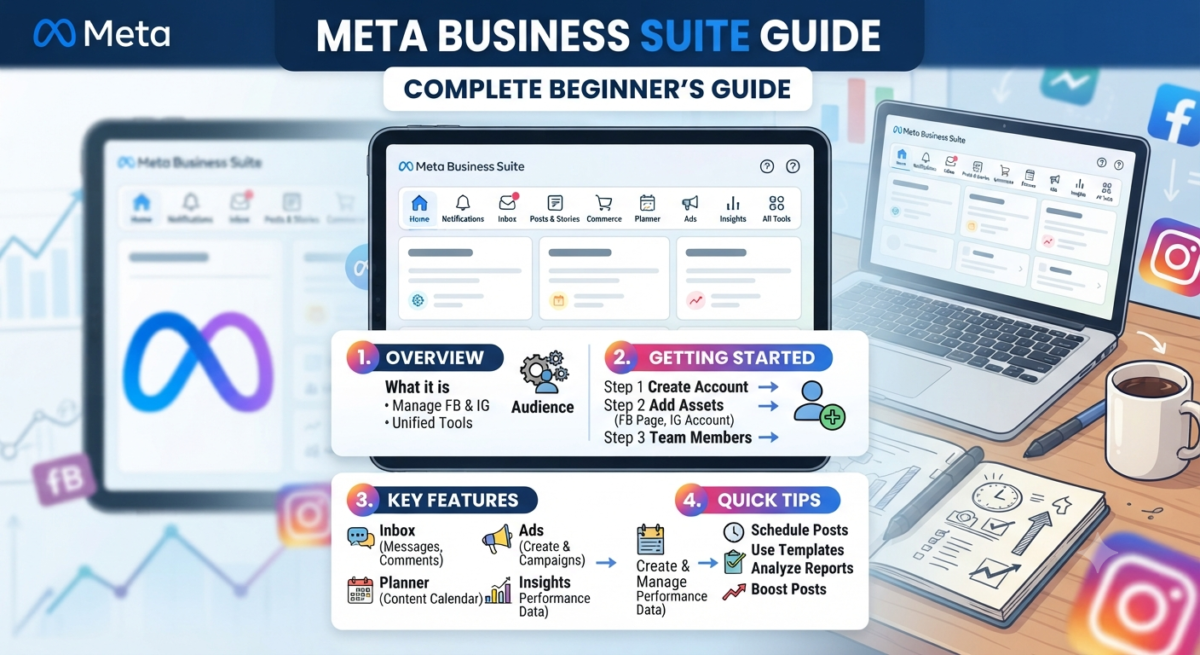
Meta Business Suite is a free business management platform developed by Meta that allows businesses to manage their Facebook Pages, Instagram Business accounts, advertising activities, customer communication, and performance analytics from one centralized dashboard.
Instead of logging into multiple platforms throughout the day, users can complete nearly every social media management task within one workspace. This makes content planning, customer support, reporting, and campaign management significantly more efficient.
The platform continues to evolve with new tools that help businesses streamline their marketing efforts while maintaining a consistent brand presence across Meta’s ecosystem.
For many organizations, it has become the primary control center for social media operations because it combines convenience with powerful business insights.
Why Businesses Use Meta Business Suite
Businesses use Meta Business Suite because it reduces complexity. Managing social media manually often leads to missed messages, inconsistent posting schedules, and incomplete performance tracking.
With everything available in one location, business owners can stay organized while maintaining better communication with their audience.
Small businesses appreciate its simplicity because they often have limited marketing resources. Larger organizations benefit from its collaboration features, allowing multiple employees to manage pages with different permission levels.
Marketing agencies also rely on the platform to manage client accounts more efficiently while tracking campaign performance through detailed analytics.
Meta Business Suite vs. Business Manager
Many beginners confuse Meta Business Suite with Meta Business Manager. Although both platforms belong to Meta, they serve different purposes.
Meta Business Suite focuses on daily business operations. Users can publish content, respond to messages, view analytics, manage comments, and schedule future posts without switching platforms.
Meta Business Manager is primarily designed for managing business assets such as advertising accounts, payment methods, pixels, domains, permissions, and multiple business portfolios.
For most small and medium-sized businesses, Meta Business Suite is the ideal starting point because it combines ease of use with powerful marketing features.
Benefits of Using Meta Business Suite
One of the biggest advantages of Meta Business Suite is that it brings multiple business activities together into one organized dashboard. Rather than spending hours switching between Facebook, Instagram, Messenger, and analytics platforms, users can manage everything from one place.
This centralized workflow helps businesses become more productive while maintaining consistent customer communication.
Manage Facebook and Instagram Together
One of the strongest features of Meta Business Suite is unified platform management.
Instead of creating separate posts for Facebook and Instagram, businesses can prepare content once and publish it across both platforms simultaneously.
This approach saves valuable time while ensuring branding remains consistent.
Businesses launching new products, announcing promotions, or sharing company updates particularly benefit from publishing content across multiple platforms at the same time.
Consistency strengthens brand recognition and improves audience engagement.
Schedule Content in Advance
Consistency plays a major role in social media success.
Posting randomly often leads to lower engagement because audiences expect regular updates.
Meta Business Suite allows businesses to create content weeks in advance using its built-in scheduling calendar.
For example, a business can dedicate one afternoon each week to creating content for the following seven days.
Once scheduled, posts publish automatically even when the business owner is busy serving customers or attending meetings.
This scheduling capability reduces stress while helping maintain an active online presence.
Manage Customer Conversations Efficiently
Customers contact businesses through comments, Facebook Messenger, and Instagram Direct Messages every day.
Responding quickly improves customer satisfaction and often increases sales opportunities.
Meta Business Suite combines these conversations into a single inbox.
Instead of checking multiple apps throughout the day, businesses can monitor every conversation from one dashboard.
This unified inbox helps customer service teams stay organized while reducing response times.
Quick communication also builds trust with potential customers who expect immediate assistance before making purchasing decisions.
Understand Your Audience Better
Successful marketing depends on understanding customer behavior.
Meta Business Suite provides detailed insights that help businesses learn which content performs best.
Users can monitor important metrics including:
Reach shows how many people viewed content.
Engagement measures likes, comments, shares, and interactions.
Follower growth indicates whether audience size is increasing steadily.
Content performance reveals which posts generate the highest engagement.
These insights help businesses make smarter marketing decisions instead of relying on assumptions.
Over time, data-driven improvements often produce significantly better results than random posting strategies.
Save Time Through Automation
Business owners frequently juggle marketing, operations, customer support, and administration.
Automation helps reduce repetitive work.
Meta Business Suite automates several daily activities including scheduled publishing, saved replies, appointment reminders, and notification management.
Instead of repeating the same customer responses multiple times every day, businesses can create reusable message templates.
This allows staff to answer common questions more efficiently while maintaining professionalism.
Saving even a few minutes each day adds up to dozens of productive hours throughout the year.
Improve Team Collaboration
Growing businesses often require multiple people to manage social media.
Meta Business Suite allows administrators to assign different permission levels to employees without sharing passwords.
For example, a content writer can publish posts while a customer service representative handles messages.
Managers can monitor overall activity while retaining administrative control over business assets.
This structured approach improves security while reducing operational risks.
Businesses also gain better accountability because every team member performs assigned responsibilities within the platform.
Support Better Advertising Decisions
Organic marketing is important, but paid advertising often accelerates business growth.
Meta Business Suite allows businesses to monitor advertising performance alongside organic content.
Marketing teams can identify which campaigns generate the highest engagement, conversions, and return on investment.
Instead of making decisions based on assumptions, businesses can continuously optimize their advertising strategy using real performance data.
Understanding both organic and paid performance together provides a more complete picture of marketing effectiveness.
How to Set Up Meta Business Suite
Getting started with Meta Business Suite is easier than many beginners expect. If you already have a Facebook Page, most of the setup process takes only a few minutes. The key is making sure your business assets are connected correctly so you can manage everything from one dashboard.
A properly configured account helps prevent permission issues, missing features, and connection errors later. Spending a little extra time during setup creates a smoother experience as your business grows.
Create a Business Account
The first step is creating a Meta business account if you don’t already have one. Visit the Meta Business Suite website and sign in using your Facebook account.
After logging in, you’ll be asked to enter your business information, including your business name, email address, and other basic details. This information helps Meta identify your business and allows you to manage assets securely.
Using a dedicated business email instead of a personal email is a good practice because it keeps your business organized and makes team management easier in the future.
Once your account is created, you’ll gain access to the Business Suite dashboard, where all management tools are located.
Connect Your Facebook Page
Your Facebook Page is the foundation of Meta Business Suite.
If you’re the Page administrator, Meta usually detects your Page automatically. Otherwise, you’ll need permission from the current Page owner before adding it.
Once connected, you can immediately begin managing content, messages, comments, reviews, notifications, and Page settings from within Business Suite.
Before moving on, verify that all business information is accurate, including your contact details, business hours, profile picture, cover image, and website link. Keeping this information updated improves customer trust and helps visitors find accurate information.
Link Your Instagram Business Account
Connecting Instagram is just as important because it allows you to manage both platforms together.
Inside Business Suite, navigate to the business settings and choose the option to connect your Instagram account.
Log in using your Instagram Business or Creator account credentials and approve the connection request.
Once connected successfully, you’ll be able to publish posts, schedule Reels, reply to direct messages, monitor comments, and access Instagram insights without leaving the dashboard.
Businesses that actively use both Facebook and Instagram often save several hours every week by managing everything in one location.
Assign Team Members and Permissions
As your business grows, multiple people may need access to your social media accounts.
Instead of sharing passwords, Meta Business Suite lets administrators assign different permission levels to employees or marketing partners.
For example, a content creator may only need permission to publish posts, while a customer support representative can respond to messages and comments. Marketing managers may require access to analytics, advertising tools, and reporting.
Assigning roles carefully protects sensitive business information while allowing every team member to perform their responsibilities efficiently.
Review permissions regularly, especially if employees leave the company or responsibilities change.
Main Features of Meta Business Suite
One reason businesses rely on Meta Business Suite is its wide range of built-in tools. Instead of installing multiple applications, users can manage nearly every aspect of their Facebook and Instagram presence from a single workspace.
Understanding these features helps businesses take full advantage of the platform.
Content Planner
Consistency is one of the biggest factors behind social media success.
The Content Planner gives businesses a visual calendar where they can create, edit, and schedule future posts.
Rather than wondering what to publish every morning, businesses can prepare an entire week’s or month’s content in advance.
Planning content ahead also improves campaign organization. Product launches, seasonal promotions, company announcements, and educational posts can all be scheduled according to a structured content strategy.
This approach reduces last-minute stress while maintaining a consistent posting schedule.
Unified Inbox
Customer communication is easier when everything appears in one place.
The Unified Inbox combines Facebook Messenger, Instagram Direct Messages, comments, and other interactions into a centralized dashboard.
Instead of switching between multiple apps throughout the day, businesses can monitor all conversations from one screen.
This improves response speed and ensures important customer inquiries don’t get overlooked.
Businesses that respond quickly often build stronger customer relationships and improve their overall online reputation.
Insights and Analytics
Publishing content without measuring results makes improvement difficult.
Meta Business Suite provides detailed analytics that help businesses understand audience behavior.
Users can monitor metrics such as content reach, impressions, engagement, follower growth, audience demographics, and page activity.
Instead of guessing what works, businesses can identify their highest-performing content and repeat successful strategies.
Analytics also reveal the best posting times, helping businesses publish content when their audience is most active.
Over time, these insights contribute to stronger engagement and more effective marketing campaigns.
Ad Management
Businesses that invest in paid advertising can monitor campaigns directly within Meta Business Suite.
The platform allows users to view campaign performance, budgets, audience reach, engagement, and overall advertising effectiveness.
Having both organic content and advertising data in one dashboard makes performance comparisons much easier.
Marketing teams can quickly identify whether paid campaigns support their organic marketing goals and adjust budgets based on actual results.
This integrated approach leads to smarter advertising decisions.
Notifications and Activity Feed
Staying informed is essential for active businesses.
Meta Business Suite provides a centralized notification center where users can monitor new comments, reactions, mentions, messages, and account activity.
Instead of checking Facebook and Instagram separately, businesses receive updates in one organized location.
This helps administrators prioritize urgent customer interactions while keeping daily operations efficient.
How to Schedule Posts in Meta Business Suite
One of the most valuable features for busy businesses is automated scheduling.
Instead of manually publishing content every day, businesses can prepare posts in advance and allow Meta Business Suite to publish them automatically.
This saves time while ensuring consistent activity across social media channels.
Step 1: Create Your Content
Begin by selecting the option to create a new post.
Write your caption carefully, upload high-quality images or videos, include relevant hashtags if appropriate, and add any necessary links or calls to action.
Before scheduling, preview the content to make sure formatting appears correctly on both Facebook and Instagram.
Small formatting issues are much easier to fix before publishing.
Step 2: Choose a Publishing Date
Instead of clicking Publish Now, choose the scheduling option.
Select the preferred date and time for your post.
Many businesses schedule content during periods when their audience is most active. While exact posting times vary by industry, reviewing your Insights can help determine when followers are online.
Planning content around customer activity generally produces better engagement.
Step 3: Review Everything
Before confirming your schedule, double-check all important details.
Verify that images display correctly, captions are free from spelling errors, links work properly, and hashtags are relevant.
Taking a few extra minutes to review content reduces mistakes and maintains a professional brand image.
Step 4: Monitor Performance After Publishing
Scheduling content is only the beginning.
Once posts go live, monitor engagement through Meta Business Suite Insights.
Pay attention to comments, shares, saves, reach, and overall audience interaction.
Analyzing this data helps identify which content performs best so future posts can be improved.
Successful businesses continuously refine their content strategy instead of repeating the same approach every week.
How to Manage Messages and Comments
Customer communication plays a major role in building trust online.
People often contact businesses with product questions, pricing inquiries, appointment requests, or customer support issues.
Responding professionally and promptly can directly influence purchasing decisions.
Understanding the Unified Inbox
The Unified Inbox displays messages from Facebook Messenger and Instagram Direct Messages alongside comments from your posts.
Everything appears in one organized dashboard, making it easier to manage conversations without switching platforms.
Unread messages are clearly highlighted, helping businesses prioritize customer inquiries.
This organized workflow reduces the risk of missing important conversations.
Using Saved Replies
Many businesses receive the same questions repeatedly.
Customers often ask about business hours, pricing, shipping policies, contact information, or available services.
Instead of typing the same response every time, Meta Business Suite allows businesses to create saved replies.
These reusable responses improve efficiency while maintaining consistent communication.
Employees can still personalize replies when necessary, but saved templates significantly reduce response time.
Managing Customer Conversations Professionally
Every interaction contributes to your brand’s reputation.
When responding to customers, use clear and friendly language. Address questions directly, acknowledge concerns, and provide accurate information.
If an issue requires additional investigation, let the customer know you’re looking into it rather than leaving the message unanswered.
Even when dealing with complaints, maintaining a calm and professional tone helps build credibility.
Customers often remember how a business handled a problem more than the problem itself.
Turn Conversations into Opportunities
Messages and comments aren’t just customer service tasks—they’re opportunities to build relationships.
Answering questions quickly, thanking customers for positive feedback, and engaging with comments can encourage repeat business and strengthen customer loyalty.
Businesses that consistently interact with their audience create communities rather than simply gaining followers.
Strong relationships often lead to more recommendations, higher engagement, and increased sales over time.
Understanding Meta Business Suite Insights
Creating great content is only part of a successful social media strategy. To achieve consistent growth, you also need to understand how your audience interacts with your posts. This is where Meta Business Suite Insights become invaluable.
Insights transform raw numbers into meaningful information that helps businesses make smarter marketing decisions. Instead of relying on assumptions, you can identify what works, what doesn’t, and where improvements are needed.
Successful brands rarely guess their next move. They study data, recognize patterns, and refine their strategy based on actual audience behavior.
Reach
Reach tells you how many unique people have seen your content.
This metric helps determine whether your posts are reaching new audiences or only existing followers. If your reach begins to decline over several weeks, it may indicate that your content needs improvement or your posting schedule requires adjustment.
Comparing reach across different content types can also reveal audience preferences. For example, short videos may consistently reach more users than static images, helping you decide what to create more often.
Monitoring reach over time provides a clear picture of your brand’s overall visibility.
Engagement
Engagement measures how people interact with your content.
Likes, comments, shares, reactions, saves, and clicks all indicate that your audience finds value in your posts.
High engagement usually signals that your content is relevant, informative, or entertaining.
When certain posts receive significantly higher engagement than others, analyze why they performed well. Consider factors such as writing style, visuals, posting time, and topic.
Repeating successful content formats often leads to stronger long-term performance.
Audience Growth
Growing followers is important, but attracting the right audience matters even more.
Meta Business Suite tracks how your audience changes over time, showing new followers, unfollows, and overall growth trends.
Steady growth usually indicates that your content is valuable and reaching the appropriate audience.
Sudden drops may suggest inconsistent posting, irrelevant content, or poor audience targeting.
Rather than focusing solely on follower numbers, pay attention to whether your audience actively engages with your content.
An engaged community provides much greater business value than a large but inactive following.
Content Performance
Every published post generates useful data.
Content performance reports help identify your strongest-performing posts based on reach, engagement, clicks, shares, and audience interaction.
Reviewing these reports regularly allows businesses to recognize successful topics and eliminate content that consistently underperforms.
For example, educational posts may generate higher engagement than promotional content, suggesting that your audience prefers learning before purchasing.
These insights make future content planning significantly more effective.
Using Data to Improve Marketing
Data becomes valuable only when it’s used to improve future decisions.
Instead of creating random content each week, successful businesses analyze previous performance before planning new campaigns.
Review your analytics monthly and ask simple questions.
Which topics generated the most engagement?
Which publishing times performed best?
Which content formats attracted new followers?
Which posts encouraged website visits?
Answering these questions helps build a smarter content strategy that continuously improves over time.
Businesses that consistently measure performance usually achieve better marketing results than those relying on intuition alone.
Common Problems and How to Fix Them
Although Meta Business Suite is user-friendly, beginners occasionally experience technical issues. Most problems have straightforward solutions and can be resolved without advanced technical knowledge.
Understanding these common challenges saves time and prevents unnecessary frustration.
Instagram Won’t Connect
One of the most common issues occurs when connecting an Instagram account.
This usually happens because the Instagram profile is still a personal account rather than a Business or Creator account.
In other situations, the Facebook Page and Instagram account may not be linked correctly.
Confirm that both accounts belong to the same business and that administrator permissions are correctly assigned.
Logging out and reconnecting the account often resolves temporary connection problems.
Missing Permissions
Sometimes users cannot access certain features even though they have been invited to the business account.
This generally happens because they have been assigned limited permissions.
Administrators should review user roles and ensure employees have access to the tools required for their responsibilities.
Using role-based permissions improves both security and productivity.
Scheduling Issues
Occasionally scheduled posts fail to publish.
This may occur because of internet interruptions during scheduling, unsupported content formats, expired account connections, or policy violations.
Before scheduling content, confirm that images meet platform requirements and captions comply with Meta’s policies.
Regularly reviewing scheduled content also helps identify any failed publications before they affect marketing campaigns.
Login and Access Problems
Access issues often result from forgotten passwords, expired authentication sessions, or security verification requests.
Enabling two-factor authentication adds an extra layer of security while reducing unauthorized access.
Businesses should also maintain multiple administrators so account access isn’t dependent on one individual.
This simple practice prevents operational disruptions if one administrator becomes unavailable.
Best Practices for Using Meta Business Suite
Using the platform effectively requires more than simply publishing content. Successful businesses develop consistent workflows that maximize efficiency while delivering value to their audience.
These proven practices help businesses achieve stronger long-term results.
Build a Content Calendar
Planning content in advance creates consistency.
Instead of deciding what to post every morning, businesses should prepare weekly or monthly content calendars.
A structured publishing schedule ensures a healthy mix of educational, promotional, entertaining, and community-focused content.
Consistency builds audience expectations and strengthens brand recognition.
Review Analytics Regularly
Analytics should become part of every monthly marketing review.
Businesses that evaluate performance regularly identify successful strategies much faster than those posting without measurement.
Even small improvements in engagement rates can produce meaningful growth over time.
Continuous optimization is far more effective than making large changes based on assumptions.
Respond Quickly
Social media has become an important customer service channel.
Responding quickly demonstrates professionalism and shows customers their questions matter.
Even when a complete solution isn’t immediately available, acknowledging inquiries builds trust and improves customer satisfaction.
Timely communication often influences purchasing decisions.
Use Saved Replies Carefully
Saved replies improve efficiency, but every response should still feel personal.
Whenever possible, personalize customer conversations by using names, referencing previous discussions, or addressing specific concerns.
Automation should support customer service rather than replace genuine communication.
Review Team Permissions Frequently
Businesses evolve over time.
Employees change roles, agencies complete projects, and new team members join.
Reviewing permissions regularly protects business assets while ensuring only authorized users maintain access.
This simple security habit reduces unnecessary risks.
Meta Business Suite vs Other Social Media Management Tools
Many businesses compare Meta Business Suite with third-party social media management platforms before choosing the right solution.
Meta Business Suite is specifically designed for Facebook and Instagram management. Because it is developed directly by Meta, businesses receive seamless integration with the latest platform features.
Third-party tools often support multiple social media platforms, making them useful for businesses managing LinkedIn, X (formerly Twitter), Pinterest, TikTok, and other networks from one dashboard.
For organizations whose primary focus is Facebook and Instagram, Meta Business Suite usually provides everything needed without additional software costs.
Businesses with broader multi-platform marketing strategies may eventually combine Meta Business Suite with more advanced social media management platforms.
Comparison Table
| Feature | Meta Business Suite | Third-Party Management Tools |
|---|---|---|
| Cost | Free | Usually Paid |
| Facebook Management | Excellent | Excellent |
| Instagram Management | Excellent | Excellent |
| Multi-Platform Support | Limited | Extensive |
| Built-in Analytics | Yes | Yes |
| Team Collaboration | Yes | Yes |
| Native Meta Integration | Full | Partial |
| Best For | Facebook & Instagram Businesses | Multi-Platform Marketing |
After understanding analytics, solving common issues, and following best practices, businesses are better prepared to use Meta Business Suite as a long-term marketing solution. Success doesn’t come from publishing more content—it comes from publishing the right content, analyzing performance, and continuously improving your strategy based on real audience behavior.
Businesses that stay consistent, monitor their metrics, and adapt to changing customer preferences often build stronger online communities and achieve sustainable growth.
Frequently Asked Questions
Is Meta Business Suite free to use?
Yes. Meta Business Suite is completely free for businesses managing Facebook Pages and Instagram Business accounts. You can schedule posts, reply to messages, view insights, and collaborate with team members without paying a subscription fee.
Can I manage multiple Facebook Pages from one account?
Yes. If you have administrator or assigned access, Meta Business Suite allows you to manage multiple Facebook Pages and Instagram accounts from a single dashboard. This is especially useful for agencies and businesses with multiple brands.
Does Meta Business Suite work on mobile devices?
Absolutely. Meta Business Suite is available as a mobile app for both Android and iOS, allowing you to publish content, respond to messages, review insights, and manage your business while on the go.
Can multiple team members access the same business account?
Yes. You can invite employees, marketers, or agencies and assign different permission levels based on their responsibilities. This improves security while allowing everyone to access only the tools they need.
What’s the difference between Meta Business Suite and Meta Business Manager?
Meta Business Suite is designed for daily social media management, including publishing content, messaging, scheduling, and analytics. Meta Business Manager focuses more on managing business assets, advertising accounts, billing, pixels, and permissions.
Can I schedule Facebook and Instagram posts at the same time?
Yes. One of the biggest advantages of Meta Business Suite is the ability to create and schedule content for both Facebook and Instagram simultaneously, helping businesses maintain a consistent online presence.
How often should I check my analytics?
Reviewing your insights at least once a week is a good practice. A more detailed monthly analysis helps identify trends, measure campaign performance, and improve your overall content strategy.
Is Meta Business Suite suitable for small businesses?
Yes. It is an excellent solution for small businesses because it combines content management, customer communication, scheduling, and analytics into one free platform without requiring advanced technical knowledge.
Conclusion
Managing your social media presence becomes much easier when everything is organized in one place. Meta Business Suite helps businesses simplify content scheduling, improve customer communication, monitor performance, and collaborate with team members more efficiently.
The key to long-term success isn’t simply posting more content—it’s publishing valuable content consistently, understanding your audience through analytics, and refining your strategy based on real performance data. Whether you’re a small business owner, a digital marketer, or part of a growing organization, using these best practices will help you build stronger relationships with your audience and achieve better marketing results over time.
Social media continues to evolve, and businesses that embrace data-driven decision-making while delivering genuine value to their audience are far more likely to stay ahead of the competition.
Need Professional Social Media & Digital Marketing Support?
Managing social media effectively requires time, planning, and continuous optimization. If you’d rather focus on growing your business while experts handle your digital marketing, Bhatti Marketing can help.
Our team specializes in Social Media Management, Facebook Marketing, Instagram Marketing, SEO, Google Ads, Local SEO, Content Marketing, Website Optimization, and lead generation strategies that drive measurable business growth.
Whether you’re looking to increase brand awareness, generate qualified leads, or improve your online visibility, we create customized marketing strategies designed around your business goals.
Explore Our Success Stories
Want to see how strategic digital marketing delivers real business results?
Visit our Bhatti Marketing Case Studies to discover how we’ve helped businesses improve search rankings, increase website traffic, generate more qualified leads, and grow their online presence through proven SEO and digital marketing strategies.
Our case studies provide real examples, measurable outcomes, and actionable insights that demonstrate what’s possible with the right marketing approach.
Ready to grow your business? Contact Bhatti Marketing today and let our experts help you build a stronger online presence that delivers lasting results.